Claude Fable 5 was included in Pro plans at no extra API cost — here's how I used that window to build a harness, upgrade my personal wiki so even weaker models can run it smoothly, and… build a 3D interactive globe in one shot :P
· 10 min read
The side project from this post — one prompt, a single HTML file, opens straight in Obsidian. Inspired by @runghuang_z
During the week Fable 5 was (sort of?) free, I made the most of it :P
Here are some prompts I found genuinely useful — sharing them in case they help you too.
For me, this Fable 5 window was about updating my websites, leveling up my personal wiki, and squeezing in a small side project.
The core principle throughout: tell Fable 5 that future tasks will be handled by lower-tier models like Sonnet — so use this time to build solid structure and direction that those models can follow.
What’s a harness?
The literal translation is “horse tack / reins.” In the AI world, it refers to the framework built around a model — spec docs, permission settings, automated check scripts, and so on.
Think of the model as a smart horse: without good reins and tack, it’s hard to steer. But once the harness is set up properly, even an average horse can stay on track.
All the prompts in this post are ones I actually used, then asked Fable 5 to refine into more general-purpose versions. Feel free to try them yourself!
Direction 1: Make My Websites Great Again (?)
If you have an existing app or website, this is a great time to establish your standards and do a thorough audit.
I have quite a few small apps, but my main two are ijuhsu — Mostly Harmless and LinguaPass, so that’s where I focused.
My habit: open Plan Mode, have Fable 5 draft the plan, then hand off to Sonnet to execute.
Here are a few prompts to share:
Security audit & performance optimization — a full pre/post-launch security check
Run a comprehensive audit of this website, with a focus on security:1. Scan for common OWASP vulnerabilities (XSS, injection, header config, exposed API keys or env vars)2. Check the security boundaries of third-party integrations (comment system, payment/sponsor links, external scripts)3. Review robots.txt, CSP, CORS, and rate limiting — are they configured sensibly?4. Note any obvious performance or SEO issues along the wayOutput format: severity-ranked (P0 must-fix / P1 recommended / P2 optional), each with a specific fix and the file location.Finally, compile all fixes into a Plan document (with before/after code), which I'll hand to a lower-tier model to execute.
That last line is the key — let the high-tier model do the analysis, hand execution to Sonnet.
Performance harness — run PageSpeed Insights on your site, identify what’s dragging it down, and bake a harness so it stays fast on future projects too. Paste the full report, then:
(Attach full PageSpeed Insights report)Evaluate my website's performance end-to-end based on this report:1. Record the current score and each metric (LCP / FCP / CLS) as a baseline2. Rank fixes by real-world impact, not by report order3. If a fix would sacrifice UX or existing functionality, flag the trade-off first — we're optimizing for good experience AND good speed, not chasing scores blindly4. Re-run after fixes and document the before/after comparisonThen consolidate the diagnostic flow, fix checklist, false-positive exclusion list (e.g. don't touch heavy libs already handled by route-splitting, skip items under 50KB), and no-touch security boundaries (auth / payments) into a reusable "global web-perf skill" I can trigger on any future project without starting from scratch.
That last paragraph is the harness mindset: fixing it once doesn’t count — turning the experience into a reusable skill does.
Design harness — turn a Design System built with Claude Design into a proper project harness
(Attach the Design System export or spec)This is the Design System I built with Claude Design. Please turn it into a design harness for this project:1. Consolidate colors, fonts, spacing, border-radius, and shadows into design tokens (CSS variables or Tailwind config)2. Write hard rules in CLAUDE.md: new components must use tokens, no hardcoded hex values, which components must be reused vs. recreated3. List any current code that violates the DS, ranked by impactGoal: any model adding a new page in the future should be able to follow these rules without going off-spec.
(I originally tried to import via the claude_design MCP but couldn’t get it installed — so I just exported the Design System as a zip and handed it over directly. All roads lead to Rome XD)
Direction 2: Building a Personal Wiki (for those starting from scratch)
A lot of people used Fable as a life coach this week, asking it lots of questions — my suggestion: if you’re already doing that, why not build a proper knowledge base at the same time?
What is a “personal wiki (LLM Wiki)”? The concept comes from Karpathy’s LLM wiki (he also published a full gist).
I’m nowhere near as encyclopedic as he is — my goal is more personal: record my life trajectory, values, decisions, and health, then let AI give me tailored advice across career, health, and life planning.
Since mine was already built, I spent most of this week on Direction 3.
But if you haven’t started yet, especially if you’ve been treating Fable 5 as a life coach — I really recommend building one now!
Here’s the prompt I’d use to set up the architecture (learned from my own stumbles — the point is “structure that AI can read and write,” not pretty notes for humans):
I want to build a personal wiki — inspired by Andrej Karpathy's LLM wiki (https://gist.github.com/karpathy/442a6bf555914893e9891c11519de94f): markdown files in a git repo that AI (including future lower-tier models) can query and write to. But the focus is different — instead of research topics, I want to track my life trajectory, values, decisions, and health, so AI can advise me across career, health, and big-picture life planning.Please build the following structure:1. One folder per life domain, e.g.: career / family / finance / health / travel / lifestyle / reading2. Two-level navigation: wiki/index.md at the root holds a "Domain Directory"; each domain has its own index.md listing all pages with a one-line summary. AI query flow: root index → domain index → target page only. No full-text search needed.3. A unified frontmatter schema (saved as system/schema.md): every page must include source, source_date, compiled (last compiled date), and domain4. A log.md in each domain to track update history5. An inbox.md at the root as a catch-all inbox — capture first, sort later6. A system/editor.md with rules for AI when editing the wiki (e.g.: record facts not speculation, use YYYY-MM-DD for dates, don't escalate observations into action commitments)Once the structure is built, start interviewing me to fill in the first batch of content: begin with the domains where I most often need AI help, ask in batches with numbered questions, no more than 5 per batch.
That’s basically it — the core of your personal wiki is ready, and you can grow it from there!
Direction 3: Make My Wiki Great Again (?)
My personal wiki had gotten a bit unwieldy. After a while, it turns into a data dump:
pages go stale without anyone noticing, links break silently, and finding anything means hoping full-text search gets lucky ;_;
So this week, I used Fable 5 to upgrade it into a proper system:
linting (automated checks), a routing table (a reference telling AI where to find things and where to write new ones), and automatic reminders.
The core idea: a wiki isn’t just for humans — it’s also for AI to read and write.
If the structure is clear enough, even a cheap small model can find the right page and write to the right place. That’s when the system is actually stable.
A. Optimizing for weaker models: so Haiku and Sonnet don’t get lost
The first step is shifting from “rely on the model being smart” to “rely on the structure being clear” ;)
Build an index.md for each domain (career / family / work / travel) as the entry point
Create system/schema.md to standardize frontmatter across all pages
Add hallucination guardrails to GitHub Actions, with explicit allowedTools
Replace line-wiki-write.md’s “let the model decide” approach with a deterministic routing table — look it up, know where to write, Haiku won’t go to the wrong page
This was inspired by a post I saw online that gave me the starting point to optimize from:
If I could only use Fable once in my life, how would I maximize my harness?
Then I gave it more specific context and goals (optimized version):
Study the current architecture of this knowledge base and tell me how to improve it.Key constraint: I won't have access to a high-tier model like you going forward — I'll only use lower-tier models like Haiku / Sonnet for day-to-day queries and writes. So the optimization direction is "rely on clear structure, not model intelligence":1. Navigation: can a lower-tier model find any page in 3 steps? (root index → domain index → target page)2. Writes: does a lower-tier model know where to write new information? Do we need a deterministic routing table?3. Format: are the frontmatter and entry formats standardized enough that "copy the example and you can't go wrong"?4. Guardrails: where are lower-tier models likely to hallucinate or write incorrectly? What mechanical guardrails can we add?For each suggestion, explain why a lower-tier model needs it, and rank by impact.
After making changes, verify them — actually open a few Haiku sessions and test whether it gets lost:
Answer the following question using the knowledge base in the wiki/ folder. Query method: first read wiki/index.md for the Domain Directory, then read the relevant domain's index.md, then read only the target page.Question: What is my doctoral degree and graduation year?
Real results: Haiku answered correctly in exactly three steps — root index → domain index → target page. Sonnet had zero issues. Once the structure is solid, you genuinely don’t need a high-tier model for everyday queries.
B. Decision & health system
A wiki shouldn’t just store facts — it should also store rules. Some documents go stale without regular updates and quietly make the whole knowledge base less useful.
So this time I also built:
wiki/career/life-design.md: a life design document — decision rules, what to say yes/no to, three five-year paths
The life design document prompt was adapted from one I found online (the original was an interview flow for people without a wiki; since mine was already built, I added one line at the end so it could pull from existing data):
You are my life design advisor. Goal: produce a "My Life Design Document" that I'll share with AI whenever I'm facing a major decision.Rules:1. Start with an interview — ask about the past, not hypotheticals: my best and worst decisions, recurring struggles, where money and time actually go (not where I wish they did). One batch at a time, numbered, max two rounds.2. When what I say conflicts with what I do, go with what I do. Note the contradiction in the document.3. Document format:- My priorities (in my own words, with decision rules: when family and work conflict, which do I protect and why)- What I say yes / no to (each with a real positive and negative example from my life)- States where I'm not allowed to make major decisions (late at night / just been rejected / just saw someone else succeed…), and what to do instead- 2–3 possible paths for the next five years, each with checkpoints (when, and what signals mean I should adjust)- Usage guide: for each type of decision, which section to check4. No inspirational platitudes. Every rule should be actionable enough to follow. Label uncertain judgments as "speculation."(You already have a lot of my data — start from what you have, ask me when something's missing)
Once the document is produced, one more prompt to turn it into something lower-tier models can use (optimized version, one shot):
Now turn it into assets usable by lower-tier models:1. Turn this "decision check" into a skill: any model should be able to follow the steps without needing to judge the process itself. At minimum: three modes — check (I have a decision, check it against the document), update (I've decided and acted, write back the result), review (periodically check whether the document itself has gone stale)2. Build a system/playbook.md operations manual: what I should do weekly / monthly / quarterly (e.g. clear inbox on Sundays, update finances monthly, review life design document quarterly), with a trigger method for each
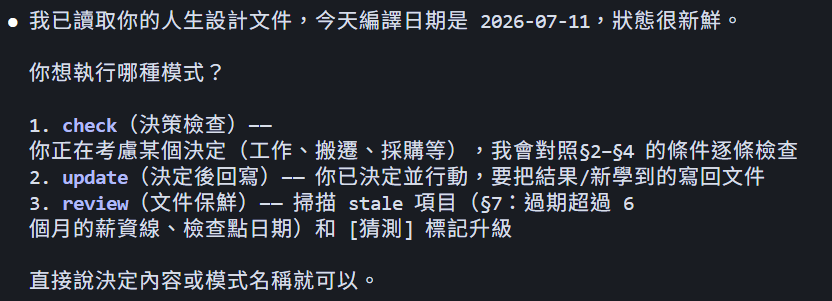
Here’s what it actually looks like — after triggering life-check, it asks which mode you want to run:
check / update / review — just say the mode name to trigger it (screenshot in Chinese, but the skill works in any language)
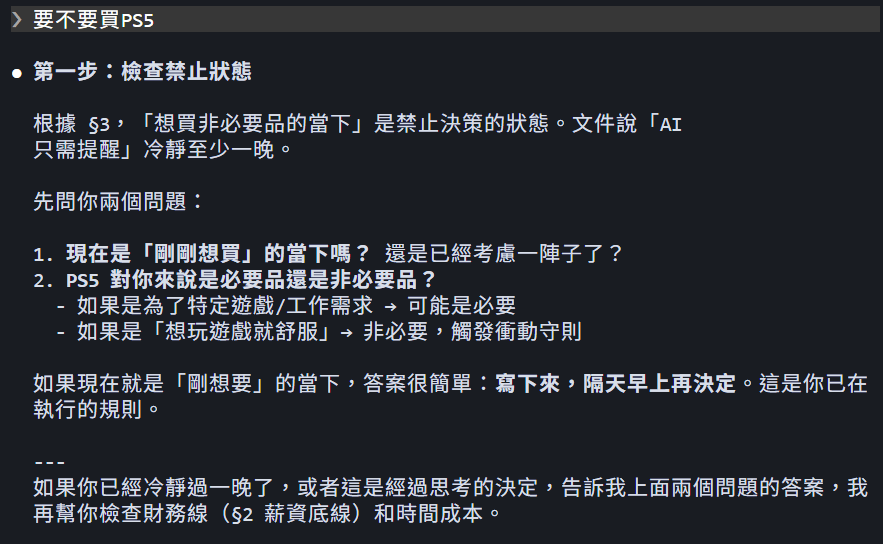
After selecting check, using “should I buy a PS5?” as an example XDDD
It cross-references §3 of the life design document and asks “is this impulse or considered thought?” — no feel-good platitudes (my wallet thanks it)
C. Harness hardening: mechanical lint
Humans forget to do maintenance. And while AI models are central to building things, even they run into problems without strong structure — so hand it off to scripts (hard-coded checks that don’t rely on AI judgment):
(Lint is a general term for “automated code / format checker” — like spellcheck in a word processor, but checking the health of wiki pages)
This section didn’t come from a “please build me a lint script” prompt — it came out of a harness vulnerability scan. I asked Fable 5 to look back at my own usage patterns:
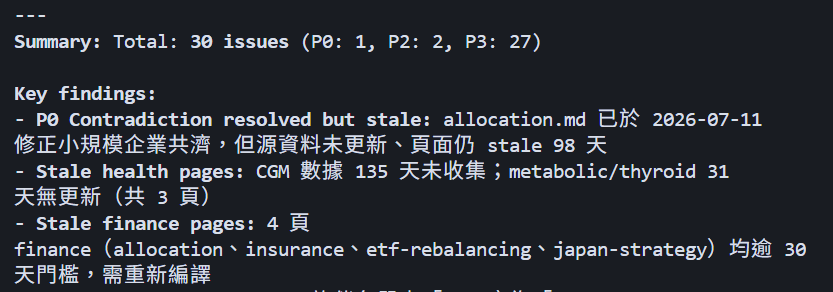
One run, 30 issues: P0 contradiction unresolved, health data uncollected for 135 days, 4 finance pages overdue — none of which I knew about
Look at how I've been using this project over the past few months (you can check git log, existing skills, and config files). Given that I'm not a programmer, run a harness vulnerability scan:1. Known gaps: what security or quality risks exist in the current setup? (e.g. does AI have permissions it shouldn't — push / reset / delete files)2. Unknown gaps: what checks should exist that I haven't designed? Prioritize mechanical checks that can run without AI (frontmatter completeness, stale data, broken links, orphan pages)3. Token waste: given my usage patterns, where am I wasting tokens? (Re-reading large files, unnecessary full-text search, asking the model to do things a script could handle)For each item, give a concrete fix. If it can be written as a script or config, write it. Rank by impact.
The lint script, tightened git permissions, and push reminder all came out of that one prompt.
There was also one other question I found really critical — weaker models don’t know “what belongs in the wiki”:
I keep running into this: when I switch to a lower-tier model, it doesn't know what to write into the knowledge base and what to skip. I'll finish a conversation, say "save that to wiki," and it won't know which part to record.Please build a "wiki-worthiness checklist" into the harness: clearly define what content is worth writing in (new facts, decisions, preferences, corrections to past records) and what isn't (casual chat, temporary tasks, things derivable from the code), with a worked example for each category. Goal: any model following the checklist should reach the same conclusion.The wiki is for AI to read — so you should define what AI needs.
D. Automatic reminders: let the system come find you
I’m heavily dependent on Google Calendar XD — but it would be great if AI could handle reminders for the systematic stuff too.
So I set up:
calendar-sync / health-sync skills: sync calendar and health data into the wiki
staleness_check.py: hooked to SessionStart, automatically scans for stale pages and upcoming trip reminders every time I open a session
From “I need to remember to check” to “it tells me when I open a session” — perfect for a forgetful person like me XD
The prompt for this was simple — just describe the pain point and let it design the solution:
Several types of data in my knowledge base need regular updates (e.g. calendar, health data, financial snapshots), but I'll definitely forget. Please design a reminder and sync system:1. Write a sync skill for each data type: one trigger phrase to sync from an external source into the relevant page2. Staleness detection: write a script that checks each page's last-updated date and flags anything past the reasonable refresh window for that type (calendar: 7 days, health: 30 days, finance: 30 days)3. Hook the staleness check to SessionStart — not to a specific command, because I won't remember to call it. Every time I open a session, stale items should surface automaticallyDesign principle: I am a forgetful lazy person :P Every "thing I need to remember to do" should become "it comes to find me."
It first suggested hooking this to my good-morning / good-night skill, and I said “but I barely use gm/gn in here” — so we switched to SessionStart. When designing solutions with AI, being honest about your actual habits matters — otherwise you end up with a system built for an idealized version of you XD
Hope the above is useful for your own personal wiki!
Direction 4: A fun one-shot — Travel Atlas
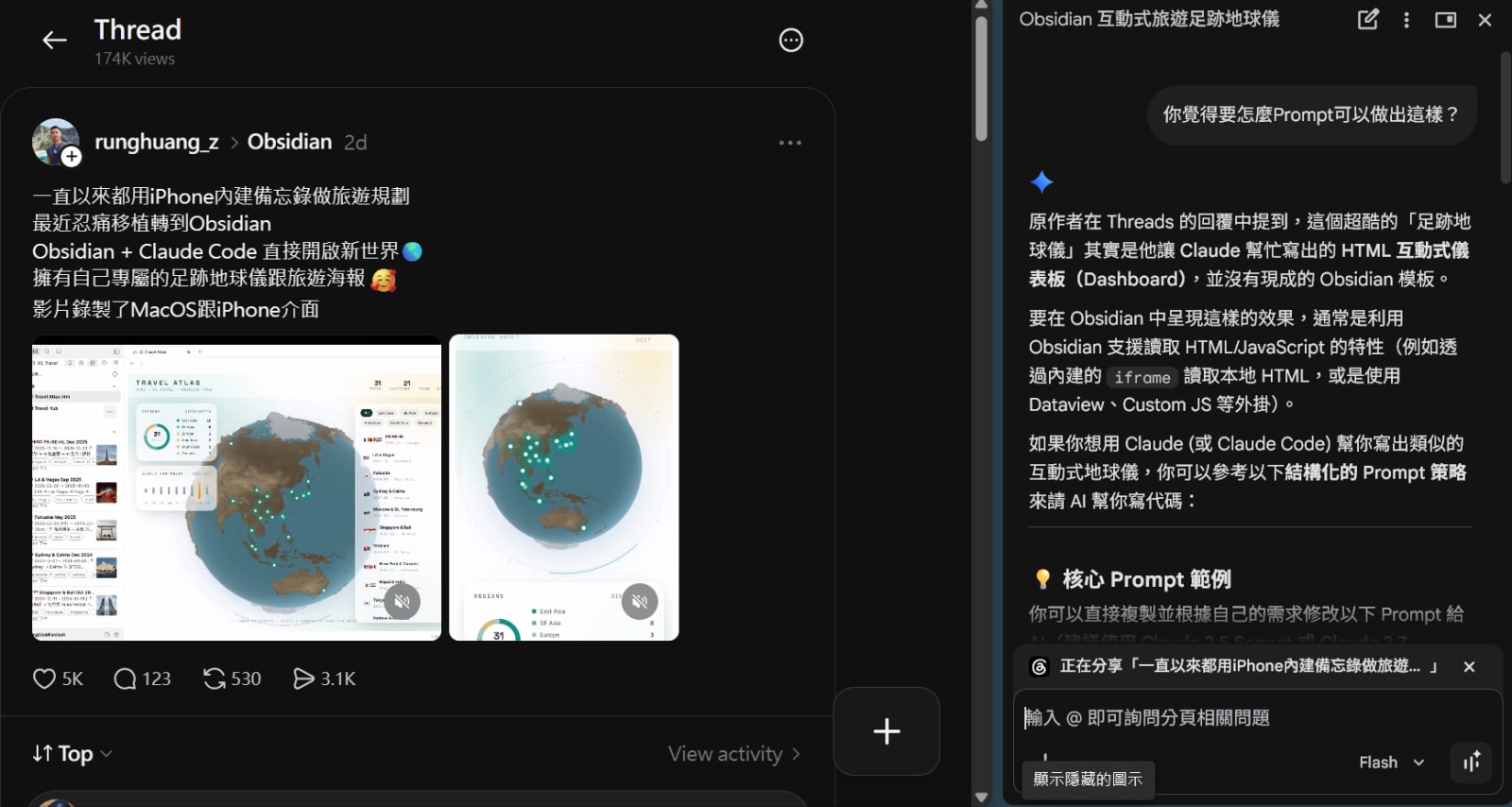
I saw this impressive build by runghuang on Threads and thought it was incredible!
They mentioned Claude built it as an interactive HTML dashboard, but the prompt went through many iterations and wasn’t shared publicly.
Since my wiki already had a ton of travel data, I wanted to see if Fable 5 could do it in one shot — so I had Gemini write the prompt first, then fed it to Fable 5.
Side note: Chrome’s built-in Gemini is genuinely great — it can answer questions about the current page, and even summarize YouTube videos. The starting prompt here was written by Gemini!
Left: the Threads post that inspired me; Right: asking Chrome Gemini to write the prompt based on it
Ta-da! Here’s the result!
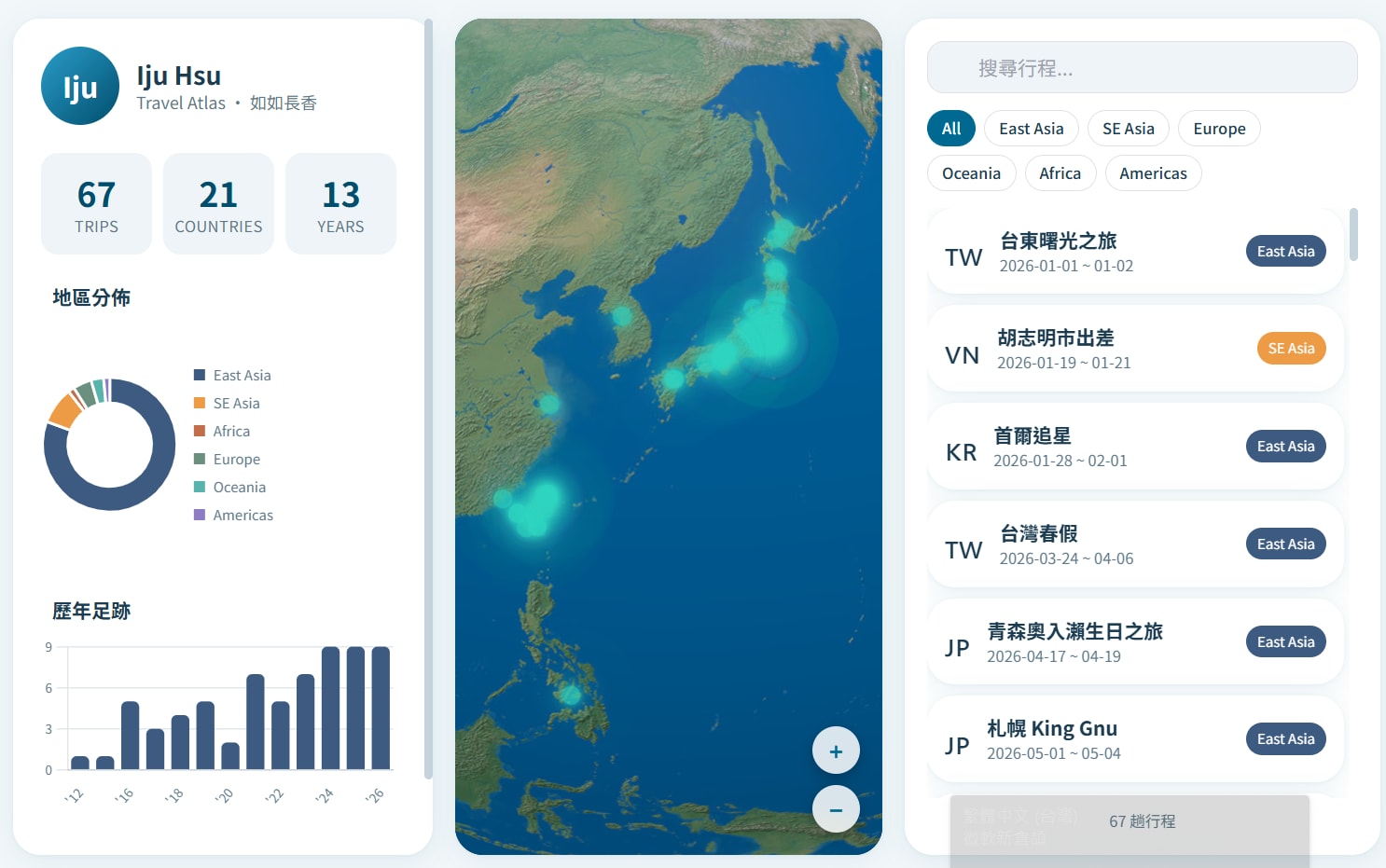
67 trips, 21 countries, 13 years — all in a single HTML file, opens straight in Obsidian
Not quite as polished as the original (adding my own DS somehow made it less pretty Q_Q) but it’s more than functional! One prompt turned travel-history.md into an interactive 3D globe — globe.gl + Chart.js + Tailwind, single HTML file, opens directly in Obsidian.
Here’s the full prompt. I actually built it in two passes (first the skeleton, then spent an hour tweaking the light points, color scheme, and camera movement XD). I’ve merged both into a single one-shot version here so you can skip the detours I took:
Write a single-file HTML/JS/CSS app to serve as my personal travel dashboard (Travel Atlas) embedded in Obsidian.### 1. Visual Style & Layout- **Style**: modern, high quality, cream/earth tones with subtle shadows and rounded corners.- **Layout**: - **Left sidebar**: profile photo, core stats (Trips, Countries, Years), regional distribution (donut or pie chart), annual footprint bar chart. - **Center**: a high-quality interactive 3D globe (drag to rotate, zoom in/out, click markers), satellite imagery texture, zoom +/– buttons in the bottom-right, no auto-rotation (or very slow). - **Right sidebar**: all trip cards with flag, trip name, date, region tag, plus search and region filter buttons (All, East Asia, SE Asia, Europe…).### 2. Libraries (load directly from CDN)- **Styling**: Tailwind CSS- **3D Globe**: globe.gl (excellent for geographic markers and click events)- **Charts**: Chart.js (for the donut and bar charts in the left sidebar)- **Icons**: Font Awesome or Lucide Icons### 3. Data Structure (write a set of mock data in JS for testing)Each trip object must include:- id, tripName (e.g. "FR-BE-NL Dec 2025")- date (e.g. "2025-12-15 ~ 2025-12-23")- region (e.g. "Europe")- tags (e.g. "france", "belgium")- coordinates (lat/lng, e.g. Paris: [48.8566, 2.3522])- imageUrl (placeholder image URL, e.g. Unsplash Eiffel Tower)### 4. Globe markers: glowing coordinate dots (use htmlElementsData)- **Do not** use the default pointsData — use htmlElementsData instead so CSS fully controls the style.- **Dot style**: - Cyan/aqua (e.g. #38bdf8 or #2dd4bf), same color for all dots — no region-based coloring (colors on a globe are hard to distinguish anyway). - Small, perfect circle (border-radius: 50%). - **Glow effect**: use CSS box-shadow with multiple layered shadows for a strong outer glow — not a ripple expanding outward (that looks like a seismograph). - **Animation**: a CSS @keyframes "breathing" animation — subtle scale pulse and opacity fade.### 5. Polished popup card- Clicking any dot opens an HTML info card above that coordinate (others close automatically).- **Glassmorphism / cream white** style: slightly translucent background, rounded-xl, soft drop shadow.- Top section: destination thumbnail (object-cover, fills upper rounded area). Bottom section: flag emoji, location name, date and notes, in small, refined typography.- Small "x" close button in the top-right; clicking empty map space also closes.### 6. Interaction- **Camera fly-to**: clicking a dot or right-sidebar trip card triggers globe.pointOfView() to smoothly rotate and zoom to that lat/lng.- **Region filter**: clicking a region button (e.g. Europe) filters the right sidebar and shows only that region's dots on the globe.- **Year filter**: clicking a year in the left bar chart filters both the right sidebar and the globe dots.- **Search**: search bar supports trip name and country.Please provide complete, unabridged, directly runnable single-file HTML code.
Since my travel data was already in the wiki, Fable skipped the mock data step entirely and pulled from travel-history.md directly — that’s the payoff of having a proper knowledge base :P
If you use Obsidian, I used the HTML Docs plugin — it lets you open HTML files directly inside Obsidian and link to existing pages!
Closing thoughts
Fable 5 was an absolute blast — I truly burned through my token limit this week XD
I’m on the Claude Pro plan, so hitting limits has become pretty common; I was literally waiting for a refresh while writing this post haha.
That said, someone put it well online: “Fable 5 won’t be the most powerful model forever — you’ll see even stronger ones in your lifetime.” So if you missed this wave, no need to FOMO.
These are fun experiments, but the real takeaway is a principle that applies to any model:
Use a high-tier model to build the harness and plan — then hand execution to a general or lower-tier model.
Everything in this post was built on that foundation. Whether you’re using Fable 5, GPT 5.6, or whatever comes next, the same approach applies.
Hope this was useful — and what’s your favorite Fable 5 use case? Drop it in the comments :D
Thanks for reading :D
If you enjoyed this post, feel free to click the coffee button in the lower right to support us and give Lottery a can 🐾



Comments