
Since I started wanting to learn Japanese more seriously, I’m sharing how I used N8N to create an automated daily Japanese news tutor called “Iju’s Daily Japanese News Tutor ver.2.” It automatically processes NHK news (or any other type of news) through AI to create learning materials, generates vocabulary and grammar explanations, and allows vocabulary to be imported into AnkiDroid for direct mobile learning 🙂
This article is more suitable for those interested in AI but don’t know where to start – let’s explore together how AI can make life better 🙂
Background
Although I’ve loved Japanese-related things since childhood (especially manga), and now frequently travel between countries, and even spent a year exchanging in Kyoto during my PhD – for some reason, I’ve never been enthusiastic about learning Japanese systematically.
After finding the courage to get a Japanese tutor (highly recommend my Japanese teacher Nami-sensei :D), I gradually gained more courage and confidence to properly learn Japanese.
I’ve also been playing Duolingo (feel free to add me as a friend), but since I’ve reached the highest level, it’s always just review without new input, which has been frustrating.
Plus, I’ve noticed my vocabulary isn’t extensive enough for daily life.
So basically, my Japanese learning had clear pain points:
- Lack of suitable, life-relevant content for learning new vocabulary
- Even with suitable content, lack of automated ways to create learning materials and flashcards
My husband once made a super cute app for me called “Iju’s Daily Japanese Tutor.”
In this app, I could choose my favorite topics, moods, and types, automatically generate related articles, and have audio for listening practice. It was incredibly cute and useful <3
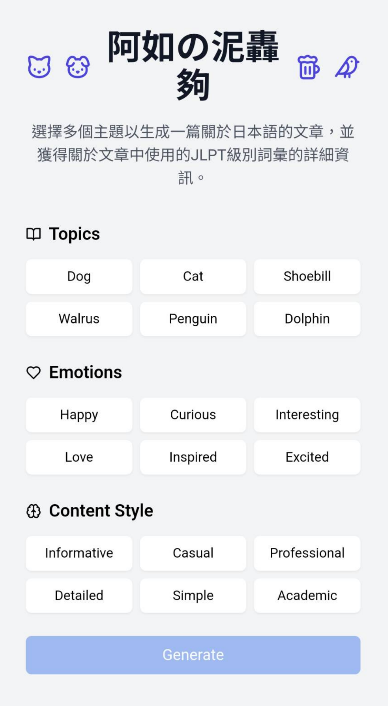
Unfortunately, “Iju’s Daily Japanese Tutor” was never published, and I didn’t want to pressure him about it, so this just stayed on my mind.
Recently, after starting to learn N8N, I suddenly realized I could also use N8N to create an automated framework (boldly calling it “Iju’s Daily Japanese Tutor ver.2”).
Once my skill tree gets more complete, I’ll properly create its interface (?)
So this is how “Iju’s Daily Japanese Tutor ver.2” came to be 🙂
Iju’s Daily Japanese Tutor ver.2
I have to say the current “ver.2” is more like a skeleton compared to the original, but the automated workflow has already built up all the content I wanted.
In the future, I can use services like Replit or Lovable to actually publish it.
There are actually quite a few Japanese learning apps like this on the market now.
Although they’re not expensive, after discovering I could make one myself and finding a suitable flow, it’s more fulfilling and might better fit my needs.
Features
Remember the pain points I mentioned:
- Lack of suitable, life-relevant content for learning new vocabulary
- Even with suitable content, lack of automated ways to create learning materials and flashcards
Therefore, “Iju’s Daily Japanese Tutor ver.2” can:
Automatically capture NHK やさしことばニュース (simplified NHK news) from the previous evening every morning at 07:00, organize vocabulary from each article (including level, definitions, example sentences) and grammar, create CSV files that can be imported into AnkiDroid to become flashcards.
This is my Notion database where you can click into each article to see content including vocabulary and grammar explanations:
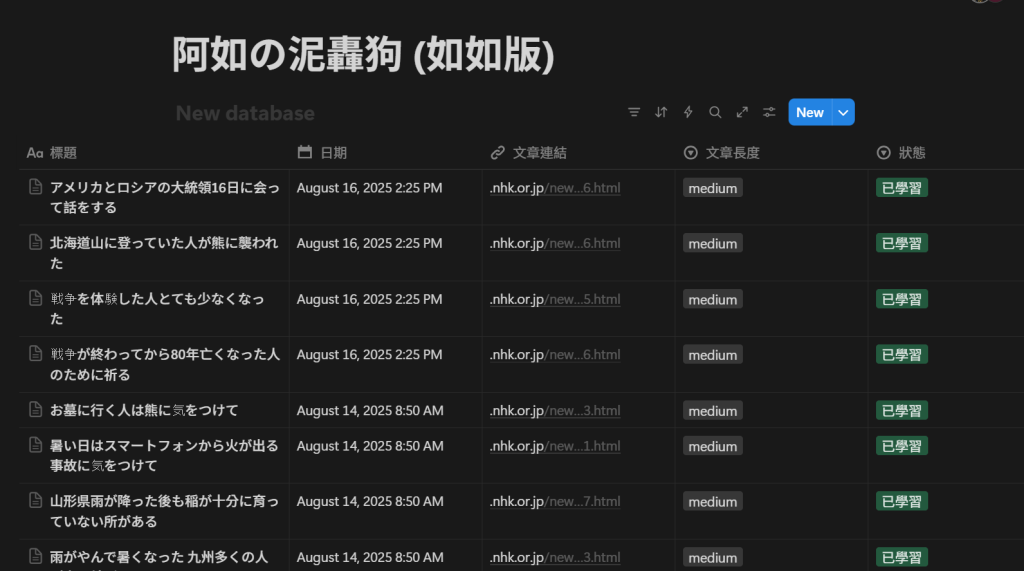
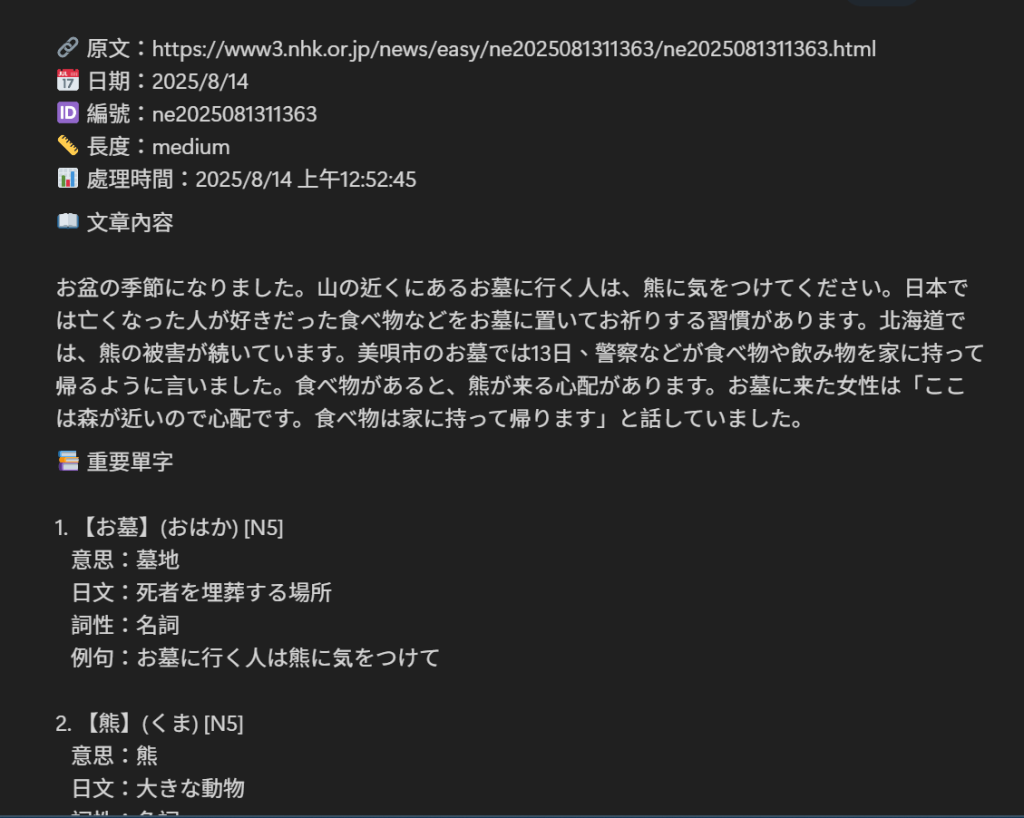
It also generates a CSV file that can be imported into AnkiDroid to import all vocabulary flashcards from this week’s news.
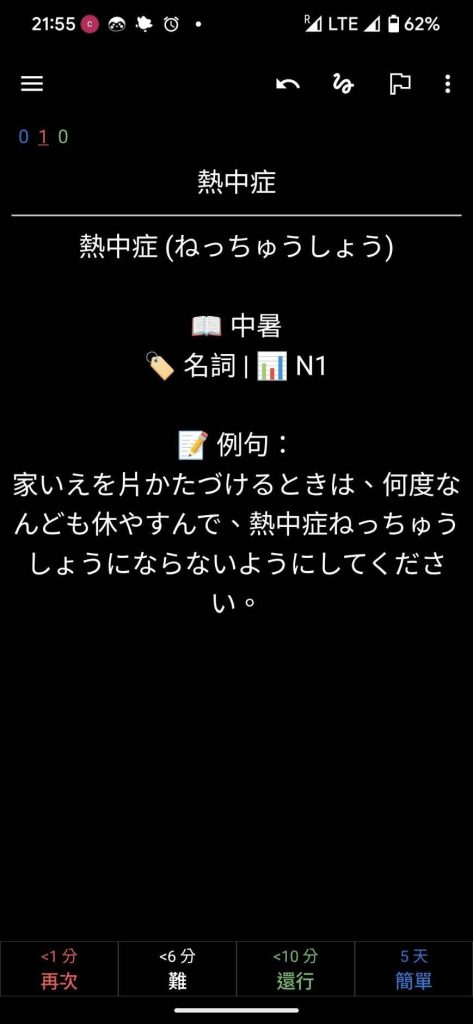
File Downloads
If you also have N8N and want identical content, feel free to download my N8N JSON file directly.
Just import it and log into the Credentials & API for each tool (I currently use: Gemini, Notion, and Google Drive) and you’re set 😉
Feel free to modify it to your preferred content – like replacing NHK news with other sources, changing Gemini prompts, or even learning other languages. I believe it’s all achievable!
If you want to try how the Notion output looks, check out my Notion database!
If you want daily flashcards to import into AnkiDroid, ask me for the Google Drive link!
Product Development Process
Now as a Product Manager (yes, I switched to PM this year XD), before making any product, I need to think about why to make it, how to make it, and what results to expect.
The following sections are more technical, breaking down my thought process. If you’re interested in product ideation, keep reading 😀
Thinking About Product Priorities
First, I thought about what content my product needed, breaking it into three most important items:
- Capture news content [P0]
- Analyze vocabulary and grammar [P0]
- Create memorizable flashcards [P0]
Plus other nice-to-have content (which I indeed didn’t implement):
- News interpretation, translation [P1] – Later didn’t include due to cost (tokens) and need considerations, though could be added to prompts
- News and vocabulary audio [P1] – Haven’t solved this yet
Ideally, this would be packaged in one app like the original “Iju’s Daily Japanese Tutor,” but limited by not having created its interface yet, at least achieving these core contents was already taking the first step for me.
I can’t find my original prompt now, but it was something like:
You are an excellent Software engineer, familiar with N8N and other automation programs. You now need to teach me, a not-very-technical Product Manager, to create an automated program that can:
Daily capture NHK news – Create learning materials from news content (including vocabulary explanations, grammar interpretations) – Import articles and lesson plans into Notion for reading – Create flashcards for mobile memorization
Before starting suggestions, please first discuss requirements or unclear content with me, then we’ll start implementing step by step.
Then it would start discussing with me, confirming requirements before actually beginning to teach me hands-on.
I highly recommend everyone ask them to confirm your requirements before generating content, so you can create something more aligned with expectations.
N8N Actual Workflow
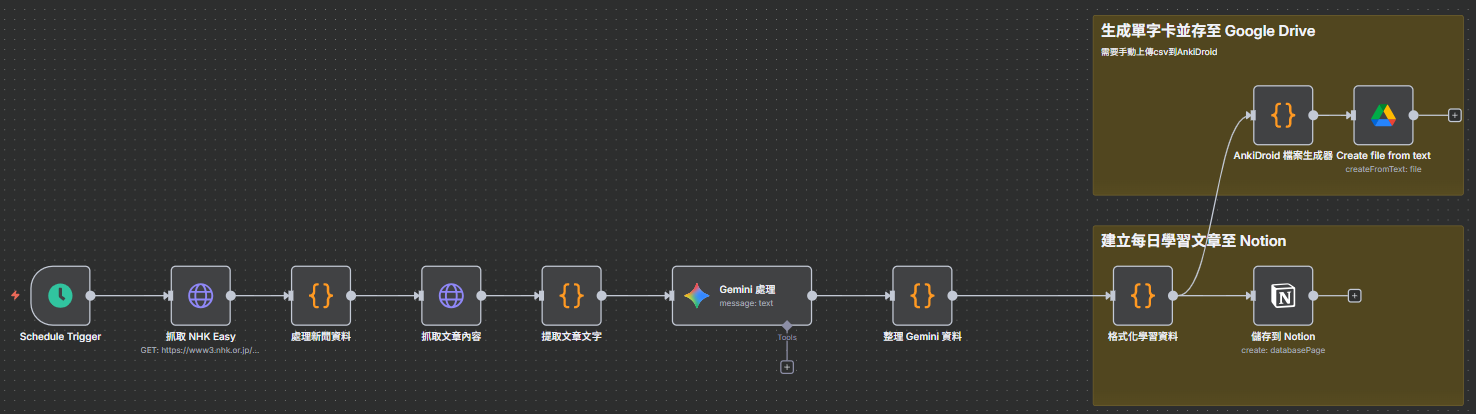
Here’s the actual workflow, briefly explained:
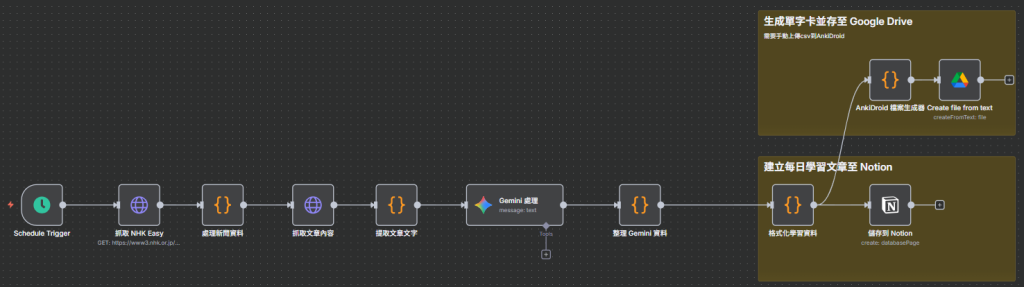
- Set Trigger Method [Trigger]: Since NHK has daily news but not weekends, I still set fixed daily times to capture news content
- Capture NHK Easy [Http request]: Set http node to capture NHK Easy pages
- Process News Data [Code]: Process captured content, mainly needing URLs for each news item from NHK Easy pages; it determines I want current day’s news, so captures other days’ news
- Capture Article Content [Http request]: After getting today’s news URLs in step 3, it separately captures content from each day’s news pages
- Extract Article Text [Code]: For example, we don’t need ads or kanji hiragana pronunciations, so simple processing is done here. Pro tip: you can show the webpage’s HTML file to LLM, it’ll better know how to process it
- Gemini Processing [Gemini, Message a model]: Send articles to Gemini, asking it to convert to my required learning material content
- Organize Gemini Data [Code]: Since Gemini data needs converting to Notion and CSV for flashcards, another conversion is needed
- Format Learning Data [Code]: Guessing this could merge with previous node, but I use it for more refined data formatting
- Save to Notion [Notion]: Send articles and materials to Notion database
- Android File Generator [Code]: Since CSV files are needed, prepare first
- Save to Google Drive [Google Drive]: Save files to Google Drive
Finally putting CSV into phone to become AnkiDroid flashcards – I currently have no good solution, need more research.
Currently manual import, but can import many entries at once, so sufficient for my current stage.
This is my first small project, definitely has room for improvement, but I feel I’ve at least taken the first step 😉
Learning Journey
- First-time creation can be panic-inducing, especially when dealing with Credentials. I recommend setting up all Credentials first to avoid rhythm disruption
- Originally used ChatGPT for LLM processing, but switched to Gemini considering cost, and results are also good Lots of trial and error. When problems arise, throw screenshots and error codes to LLM to solve together. Issues I encountered:
- Website captured lots of unnecessary kanji pronunciations – Solution: Show HTML to LLM, find truly needed information
- LLM-generated notes weren’t good enough – Solution: Ask LLM what the best prompt is, then multiple trial-and-error attempts
- When technical skills might not be sufficient like mine, finding truly core requirements is important. Other nice-to-have parts require mental preparation to temporarily set aside
Conclusion
This is a beginner’s learning journey. If you’re also stumbling along the AI learning path like me, I hope this article can help share a bit of insecurity through my product development process and learning journey.
Of course, there’s still a long way to a mature product, but this small MVP has already given me considerable confidence and interest.
Small steps in #BranchingOutAISkillTree – welcome back next time!
Thanks for reading:D
If you enjoyed this article, feel free to buy me a coffee — and a treat for my lovely dog Lottery! 🐾
Hello bro, i was doing a similar workflow in N8N but it seems like the NHK website now asks for an authentification:/
Hello Marco thanks for asking.
I’m using this website instead: https://nhkeasier.com/
Which has the RSS feeds availble. Hope it helps 🙂